
Blog

WS-Security unveiled


One of the more
complex examples that ship with WLS is a WS-Trust based authentication of a web
service using SAML assertions. This example is quite easy to setup and run and
the example’s documentation gives a basic understanding of what is going on.
But we want to look deeper and shed light on the complexity that is hidden
behind SSL, WS-Trust and SAML authentication. In a first step we separate the
scenario from the example server and integrate it into eclipse, to create an
isolated laboratory environment for further investigation. We will use
Wireshark to analyze the actual flow of messages on the wire. We even look
inside the SSL streams to identify the WS-Trust tokens and SAML assertions as
they are passed between the participants.
 

The WS-Trust specification, which is part of the WS-* stack of specifications for web services, was approved as OASIS standard in March 2007. Meanwhile it is generally accepted as an industry standard for implementing secure, trusted, and federated message exchange between service providers and consumers. So now is a good time to have a closer look at this technology. Despite the complexity of this topic, it is fairly easy to set up running examples of WS-Trust based java implementations using the examples that ship with Weblogic Server. We want to have a closer look at one of these examples: “Using SAML 1.1 Bearer Assertion for Authentication Case”

Read the full article as PDF: WS-Security_unveiled.pdf (1,6 MB)

Links to Files used in the Project:


Toolbox: The Mini-ID


This part of the
toolbox series introduces the Mini-IDE project. It is designed to instantly
setup a weblogic server together with a small sample application. It provides everything
to setup and run the example in less than five minutes. Despite its simplicity,
it contains everything to build and deploy a Java EE web application, relying
on not more than a WLS installation. It can easily be modified and used in
analysis situations or as a starting point for proof of concepts. In environments
where access is restricted to shell usage, we provide a distribution method
based on copy and paste via the clipboard. 
 
Read the full article as PDF: Mini_IDE.pdf (1,3 MB)

File from the Project: transfer_archive.txt (17 KB)


OEPE JavaEE Lab Tutorial for JSF


We want to look at a simple tutorial from the Oracle web site which demonstrates how to
develop a simple JSF web application with Eclipse and the Oracle Enterprise Pack for
Eclipse. Since this tutorial is targeted to WLS 10.3 there are some modifications to be made,
in order to run it with WLS12c and OEPE 12c. We take a brief look at the example itself and
point out the changes.

This tutorial guides the user trough the process of creating a Dynamic Web Application with Java Server Faces. It elaborates on creating bundle messages for internationalization and on creating page flow diagrams.

Read the full article as PDF: OEPE_JSF_Intro.pdf (95 KB)


OEPE Hands on Labs for WLS 11g

After some frustrating
moments, trying to quickly going through the OEPE 11g Hands-on-Labs for
Web-Services on WLS12c, I spent some time with problem analysis and eventually
confirmed that the labs still run with the latest versions of WLS and Eclipse. We
will present a graphical overview of each lab and  note some required changes for the version
OEPE 12c.
 

There are some small hands-on labs which demonstrate some OEPE features. They are targeted for WLS 11g and OEPE 11g. With some minor changes they also work with WLS12c and OEPE 12.1.1. We will give an overview of the labs and point out some relevant changes for the new version.

Read the full article as PDF: OEPE_Hands-on-Labs.pdf (947 KB)


Setting up a WLS-Webservice Example in Eclipse


I like the API
Examples that ship with WLS because they contain a level of complexity that is
just enough to demonstrate the technology slice at hand. In other words, they
are kept very simple. Therefore they are an excellent starting point for small
test applications that can be used in very complex environments. We want to
look at the Example: “Creating a Web Service from an Existing WSDL File”. We
demonstrate how to quickly integrate it into Eclipse with full support of code
completion, context sensitive help and on-the-fly compilation support. 


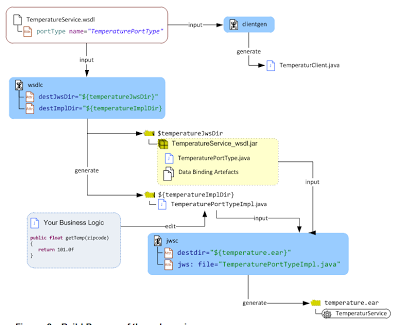
In this little workshop we show how to integrate a simple web service example into an eclipse project which features context help, code assistant and on-the-fly compilation. Starting from a running example, which is part of the WLS installation, we produce an eclipse project which builds, deploys and runs this example. However instead of changing code with a text editor as it would be required in the original example, we now have the full IDE support. This enables us to quickly extend it to include code for prototypes and tests scenarios.

Read the full article as PDF: WLS12c_WS_from_WSDL.pdf (1,5 MB)

WLS12c and the Oracle Enterprise Pack for Eclipse     

  The Oracle Enterprise Pack for Eclipse extendsthe IDE to tailor it to the use with WLS. It contains a number of editors and
features which makes the interworking smoothly. We will have a look at the OEPE
and how it plays together with WLS12c on an OSX installation.

WLS ships with ready to use and configured
examples. We will look at one example that demonstrates JavaEE6 features. We
want to use Eclipse not only to analyse the examples, but also demonstrate a
setup as an Eclipse project to go through the full edit – compile –install-
test cycle. This exemplifies the usage of the WLS examples as mini projects,
which can be used in situation where we want to run simple tests or in
prototyping situations.
 
Read the full article as PDF: WLS12c_and_OEPE.pdf (2,5 MB)